
Manage the Program Better
View or download the code for this chapter on GitHub:
github.com/nousbase-edu-codes/First_Steps_in_Python
TL; DR
- Functions = A named block of code that performs a specific task.
- Functions are reusable, functions make code easy to manage and reuse
- Arguments = Inputs you give to a function.
- Return = The output a function gives back.
- Functions teach us how to organize actions.
- Classes teach us how to organize data and actions together.
- Constructor = A special method that creates object and sets its initial data
We are already using functions and objects(classes).
It's time to write our functions and classes.
We have seen, how beautifully functions help us cover a lot of code into single line.
A function is:
- A named block of code
- That performs one specific task
- And can be used multiple times
Think of a function like a machine.
You give input. - It does work. - It gives output.
Defining Functions and Calling Functions
Until now, we have been calling functions. e.g. print( Hi )
When we call function writing function name, parenthesis ( ) and arguments, the code of function actually runs at that point.
But where is that code of the function? It is written in the definition of function.
Function is defined using keyword def and function name.
While naming the function, we specify the arguments too.
print("Welcome to Sci-Mate Club!", name)
This is the simple example of a function.
Here, name is an argument.
Some functions like print( ) simply do a certain task and do not return any value as output.
Function like len( ) which we used to count the number of items in list, return certain value as output.
Write A Program To Know About functions returning value
Let's say, we want to write a function which calculates the age of the applicants for the membership of Sci-Mate club based on age.
age = get_age(birth_year)
Here, we expect age to be returned by the function get_age( )
We will now define the function get_age( ).
applicant_age = 2025-year
return applicant_age
We defined the function with keyword def and argument.
Inside the function, we used argument value to calculate age of the applicant.
Then we returned the value using keyword return.
NOTE: Whenever return line is executed in function code, execution of function stops and we come back to the code where the function was called.
e.g.
applicant_age = 2025-year
return applicant_age
print( This is the line after return )
In above code, This is the line after return will never be printed. It is after return line so, never executed.
Now let s write a function to check if one is eligible for membership based on age.
age = get_age(birth_year)
is_age_eligible = check_age_eligibility(age)
define the function.
if(age>=18):
return True
else:
return False
Here, return is inside if or else block. So, return statement will be executed if block condition is satisfied and then only program will also exit.
Challenge: Just like age eligibility, can you write educational qualification checking function too?
Try it!
Plan what you need to ask to user, how you will ask it to user, how you will check the conditions and when you will return True or False.
Just to remind you, eligibility criteria is either science graduate or any post graduate.
Three important concepts related to functions:
We need to know 3 important concepts related to function:
Scope: Recall, we had intuitively explained scope of variable with office hierarchy example.
To remember simply, a variable inside a function is not available outside.
It is called local variable.
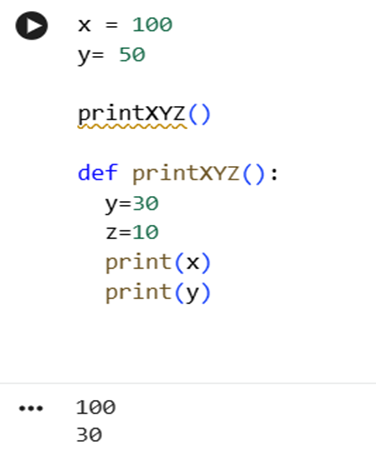 Variable
outside the function can be used inside the function and it is called global
variable.
Variable
outside the function can be used inside the function and it is called global
variable.
As we can see in the image,
x is outside the function, so function can access it.
y is outside the function (global) and also inside the function (local).
We can clearly see that function prints local y ignoring global.
z is totally local to function. If we try to access it outside the function, we will get the error.
Default parameters (arguments):
We can assign default value to function parameters(arguments). If we call function without argument, the default value will be used.
We provide default value during the definition of the function.
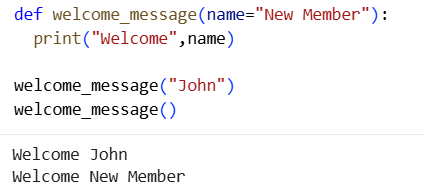
We can see in image, when argument John is provided, message is printed with the name of John.
When we didn t provide any argument, message is printed with the default value, which is New Member
Keyword arguments:
We can call functions with the arguments names too. These are known as keyword arguments or named arguments.
For example, get_age(1990) is same as get_age(birth_year=1990).
Remember: birth_year is the parameter/argument name used in definition of the function.
Take an example, if a function definition reads like
Then whenever we call like calculateBMI(175,75); 175 will be assigned height and 75 will be assigned to weight. It follows the sequence in the definition of function.
However, we have liberty to change positions if we are using keyword based calls.
So, calculateBMI(weight=75,height=175) is correct and valid.
We can also force users to use keyword arguments.
For this, we will need to use * in definition of the function.
All the arguments after * have to be specified with keyword.
Can you have variable number of arguments?
Yes. We use *argument_name for this purpose and treat it like collection in definition of the function.
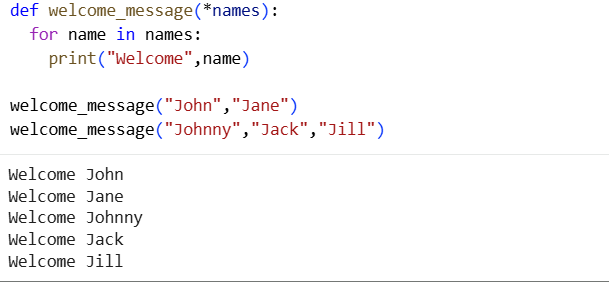
We can see in image, when we use *names, we can use function with any number of arguments.
All these details may seem too much for now, but we will also revisit them while writing our Sci-Mate application.
Progress Unlocked
- You know how to write your functions and return value
- You know default arguments, variable number of arguments, named/keyword arguments and scope of variable- you know too much now!
In our age computation program, we simply calculated age by subtracting birth year from 2025.
Now, program isn t made to run only in 2025. We need to calculate current age using current year.
We can calculate current age using datetime class.
But this datetime class isn t by default available in Python. You will need to import it, just like we import some goods which are not produced in our country.
What do we need to import? We need to import Module
Module is an already written file with python code which has classes, functions, variables etc.
We can use these classes or functions if we import the specific module.
How to use the class in module? Our old familiar syntax of .
Simply, with syntax: name_of_module.name_of_class
Can you guess how to use method of the class in module now?
Yes, you are right. With . again.
Syntax is: name_of_module.name_of_class.method
When there are many modules together, we call it Library. Usually, libraries are aimed at specific purpose.
Python has rich set of libraries for various purpose. Our all efforts of re-inventing the wheel are saved if libraries or modules exist for some purpose.
Someone has already written code for us to calculate current date and time.
We just need to import that code (or that module).
We import using the keyword import.
So, let s import datetime module
Now, typing datetime name every time can be tiresome. So we can also assign alias/short name to module while importing.
Let s decide short name for datetime as dt.
So, our line becomes
This Module has class datetime (yes, same name!)
And class has method now( ) that returns current date time in full format.
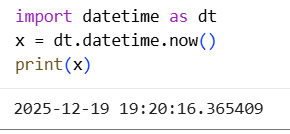 Looks something like this in the image.
We can also format this date returned; I will leave it to you to search and implement that part as an exercise (do it after you finish the book).
As of now, we just need year to calculate date of birth.
It s simple. Use year property of the object returned by now( ).
So, x.year works fine here.
Let s cut some steps.
Instead of assigning value to some variable, we will directly use dt.datetime.now().year.
See what do we get
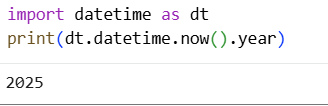
So, it s fine!
Now even in the function get_age(); let s cut some steps return statement.
def get_age(year):
return (dt.datetime.now().year-year)
We can see in the image below, this works perfectly fine.
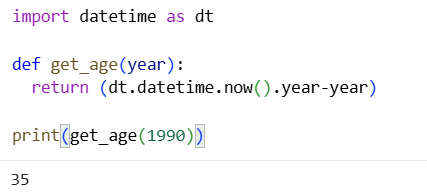
So, here we learn how to use import and how to calculate the current age.
Challenge: Learn more about datetime. Use Google or LLM.
We can create a new datetime object with the code below:
Find the methods that we can use on x to get month and date.
Progress Unlocked
- You know how to import modules and libraries and how to use them
- You can make Sci-Mate application now more realistic and useful.
Optional reading:
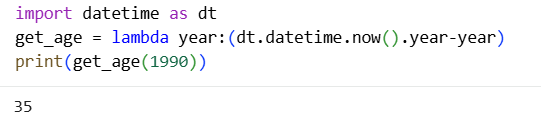
We can even shorten get_age( ).
We can use the keyword lambda. It is typically useful for such small methods.
We do not use return keyword. We just use an expression which calculates value to return.
See the example below in the image for the syntax.
Challenge: Let s do some exercise:
Below is a code that calculates average of the numbers in list.
Rewrite the above program by splitting it into two functions:
total = 0
for n in numbers:
total = total + n #calculates total
average = total / len(numbers) # calculates average
print("Total:", total)
print("Average:", average)
(hint: you can write functions total() and average())
If this feels like a lot, do not worry. You do not need to remember everything now. You just need to recognize these patterns when you see them again.
Classes and Objects
We now know two things about classes:
1. Classes combine data and methods
2. Classes are used to represent a particular type of data
Purpose of using classes and objects is to easily model the real world.
If we want to model real world classroom, Student will be the class, individual students like Micky and Minnie are objects. Data of objects will be marks, attendance, enrolment number, course etc. Methods will be get_parents_contact( ) etc.
Very intuitively, in case of Sci-Mate club, member will be the class. name, membership_ID, educational_qualification, address, contact, birth_year will be the data.
Note that, we store birth_year (or date of birth) instead of age, because age will change every year. So, it s wise to store birth_year and compute age whenever required.
Now, this indicates need to have a method to calculate the age.
So, we will have methods like get_age( ) too.
Like functions, there is specific syntax for defining classes too.
Before moving ahead, we will look at the concept of constructor and object creation.
Constructors
We need to create the objects before using them. We use special type of function/method to create, called Constructor.
What does this mean?
As we know objects have data (e.g. name, address etc for member object).
Job of the constructor is to assign some values to these data fields in the object.
If we want to create object member_1 of class Member, we use something similar to-
Yes! That s right. We use name of class followed by parenthesis and arguments inside it.
How many arguments? Well, it depends on the code of the class.
Arguments of constructors can be set to default (like default arguments for methods) thereby allowing us to have constructors accepting different number of arguments.
Let s see now how to create class.
We will now write a class that will be used to store the details of the members of class.
Name of the class: of course, Member (it is convention to start the name of class with capital letter)
What data object of Member will hold? For now, we will store name, birth_year, phone and address.
How the construction of the Member should be?
Well, while creating the new member, we must have his name, birth_year and also at least contact number.
So, we can have constructor with 2 arguments for name and phone.
What methods it will have?
As of now, we can think of 2 methods:
1. get_age( ) method to compute age: note here, as we are storing birth_year as a part of object data, we don t need to provide it as argument. This is how classes make coding more logical
2. set_address() method to set address, which is not part of constructor
classes are defined using keyword class.
So, when we write,
we start the block of codes for the body of the class.
Next step, write constructor.
Constructor has special syntax, it is a method with name __init__( )
with 2 underscores around init word.
It has one argument as self.
Here, self is used to refer the object within its body.
To get intuitive understanding, think of self as pronoun.
You refer to yourself as I, and I refer to myself as I. We both have different names, identities etc. But for own ourselves, we are just I.
Same way, object refers to itself as self inside the body of class.
Other arguments will be those you want to set, in our case, name, birth_year, phone.
We will set blank text as value for address, for now.
So, our class definition looks somewhat like:
def __init__(self, name, year, phone):
self.name = name
self.birth_year = year
self.phone = phone
self.address=""
We can now create member like:
m1 = Member( "John" ,1990,1223)
[we don't write self here!]
And we can access phone number of John using our familiar . notation!
m1.phone gives us m1's (or John's) phone number.
It s time to add methods.
Methods are written just like function inside class body. Methods have access to the data fields of class. Other details, we need to supply using arguments.
Let's write get_age( ) method.
return (dt.datetime.now().year-self.birth_year)
We need to import datetime as dt before starting to write the class in order to use the class datetime.
Our code reads-
class Member:
def __init__(self, name, year, phone):
self.name = name
self.birth_year = year
self.phone = phone
self.address=""
def get_age(self):
return (dt.datetime.now().year-self.birth_year)
It's time to set now the address. We will define set_address( ) method.
Since we want set new value for address field, this value should be given to set_address method as a part of argument.
So, our updated class looks like-
class Member:
def __init__(self, name, year, phone):
self.name = name
self.birth_year = year
self.phone = phone
self.address=""
def get_age(self):
return (dt.datetime.now().year-self.birth_year)
def set_address(self,new_address):
self.address = new_address
and our class is ready to use.
Note: Every method has self as first argument. This allows us to access the data of the object inside the methods.
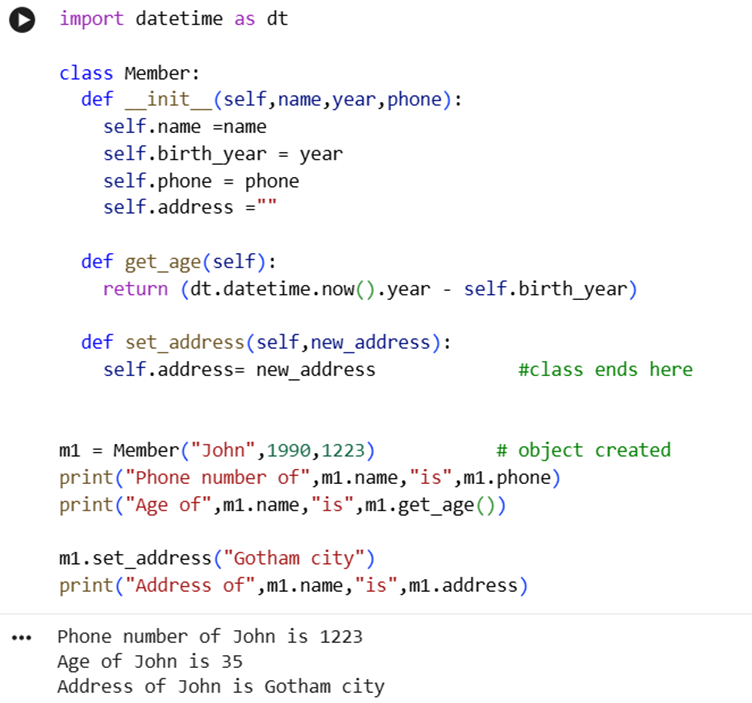
Refer to the image below. We have imported datetime, defined class Member with methods, then also created Member object, printed his age, updated address and displayed the updated address. We also accessed the data of the class.
This paradigm of programming where we model the data and methods with classes and objects is known as Object-Oriented Programming.
Progress Unlocked
- You can write your own classes
- You know about Object-Oriented Programming
- You can make Sci-Mate application with Object-Oriented Programming paradigm
We have learnt a lot in this chapter and a lot of the things might be new to you.
If it feels overwhelming, take a break and read chapter again, type the program hands on!
You can create your own class named Person, where you store name, height, weight and age. And a method to calculate BMI. You can use it for yourself and your friends!
Concepts we learnt revisited:
v Functions are blocks of code doing specific task
v Functions accept arguments as input and return output
v Arguments or parameters can be default, can be named/keyword, can be of varying length
v Classes combine data and methods together
v We need to create objects before using them. We use Constructors to create object
1-Minute Challenge
In our Member class, create following methods:
1. update_name : to update names of member
2. A new field, "fees_status" and method to set it "Paid" or "Due"
3. A new field, "education" and method to set it to "science_graduate" or "post_graduate"