
Make Programs Better
View or download the code for this chapter on GitHub:
github.com/nousbase-edu-codes/First_Steps_in_Python
TL; DR
Collections = Variables that can hold more than one value at a time.
Iteration = Visiting every item in a collection one by one using a for loop.
classes = A blueprint that describes the properties and methods
objects = Items that follow blueprint of classes
List [] = An ordered collection of items. (Think: a list of names of students).
index = The position number of an item in a list (Starts at 0).
Tuple () = A "locked" list that cannot be changed. (Think: A Sealed Envelope).
Dictionary {} = A collection of data with labels (Keys) instead of numbers. (Think: A Phonebook).
Data with Actions, together
Till now, we have written programs where data and functions mostly lived separately. We created values, stored them in variables, and passed them to functions.
But as programs grow, this separation starts feeling limiting. Some actions naturally belong to specific data.
Consider this statement:
Here, append() is not called on its own. It is called on marks. This tells us something important.
marks is not just data. It also knows what actions are allowed on it. This idea appears again and again in Python (and in Programming)! Objects and Methods
When data and its related actions live together, we call such a value an object. An action that belongs to an object is called a method.
Methods are called using a dot after the object name.
marks is object and append() is a method.
This idea helps us to model real world much easily. Let s see how-
Intuition: Classes and Objects
In the world around, you can find many objects of similar type. we group things by common properties and actions. Such types are an idea of Class in programming.
For example, you have 2 pet cats, Snowy and Gingie. Being from same species Cat , You can describe both of them in similar way. So, Cat here is a Class from programmer s view.
They have certain properties like, fur color, name, height, weight etc. They do certain actions like playing, eating or meowing.
These properties and actions are common among cats.
The idea of a cat defines these properties and actions. Individual cats like Snowy or Gingie are actual examples of that idea.
This blueprint of properties and actions is called Class. So, cat is a class and individual cats like Snowy or Gingie, which follow this blueprint are called objects of class.
Like in real world, almost everything is object; in Python too, almost everything is object. Classes have methods. Methods are similar to functions, but they belong to a specific object. That is why they are called using a dot.
gingie.play()
Each method call applies only to that object.
Why This Matter Now?
Lists, tuples, and dictionaries that we will study in this chapter are not just collections of data. They are objects.
They come with their own methods that allow us to:
- add items
- remove items
- inspect data
- transform data
Understanding this makes the upcoming code clearer and more meaningful.
Class: Cat
Properties: Name, Fur_color, Height, Age
Methods: Eat, Play, Meow
Objects:

|

|
|
Properties: Name: Snowy Fur_color: White Height: 15 cms |
Properties: Name: Gingie Fur_color: Ginger Height: 13 cms |
|
Calling Methods |
|

Snowy.catch(mouse) Note: eat( ) method is called just like function and has mouse as argument |
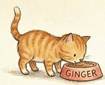
Gingie.eat(food) Note: eat( ) method is called just like function and has food as argument |

Snowy.meow( ) |

Gingie.play( ) |
This is an intuitive introduction to objects and classes.
Progress Unlocked
- You now can understand syntax like obj.method( )
- You intuitively learned the concepts of class and object.
- You are ready to learn about collections
Collections
Remember our club Sci-Mate?
Suppose, this Sunday, club has a special event and club wants to display the welcome message to 4 new members of club with their name.
For now, we will just display the message with print( ).
How can we do this? Let s brainstorm the ideas.
Write a print( ) message 4 times with the name of each member Welcome! John . that s bad idea. We want to make programs efficient
Write a for loop Good idea! But how to have names of members in for loop?
Do we need to create 4 variables like member_1, member_2, member_3, member_4? looks difficult to manage! Won t work inside loop as every variable is different.
So, what s the solution?
Can we store many values together and treat them as one unit?
Yes. That is exactly what collections do.
Lists: First Collections
A list is a collection of values stored in a specific order.
Creating a list is very easy. Just use [ ] and all the values in between them.
In our case,
That's it! List of members is ready!
Here,
- members is one variable
- It stores multiple values
- Values are inside square brackets
- Values are separated by commas
Ok! That s good. But how can we use it in the loop?
- You can access items of the list with a number. This number is called index and it starts with 0. It is based on the position of the item in list.
- First item of list has index 0. So, index of John is 0, index of Jane is 1 and so on
- You just use [ ] to access the item at specific index, e.g. members[0] is used for John, members[1] is used for Jane
- You can get how many items are in list using function len( ). e.g. len(members) gives us 4
And that s clear now.
We will use in operator to access items of members list. And here is the code!
for member in members:
print("Welcome!",member)
Processing the lists
We have stored names of the members in the list.
Suppose, during the operation of club, various situations arise and we have to process the list as per requirement. Lists provide bunch of methods for this.
Let s handle situations one-by-one.
As of now, members list is [ John , Jane , Jack , Jill ]
| Sr no | Situation | Solution | Output |
| 1 | A new member joins the club, named Johnny | members.append( Johnny ) | [ John , Jane , Jack , Jill , Johnny ] |
| 2 | Jill decides to leave the club membership | members.remove( Jill ) | [ John , Jane , Jack , Johnny ] |
| 3 | A new member joins club, also named John, he is the second John | members.append( John ) |
['John', 'Jane', 'Jack', 'Johnny', 'John'] Note: identical items can be added to the list |
| 4 | Club manager wants to know how many John are there | members. count( John ) |
2 Counts the occurrences of the specified item |
| 5 | To identify the members with same name, club manager decides to add last name initial to newer members of same name |
members[4] = John D 4 is the index of the newly added John |
['John', 'Jane', 'Jack', 'Johnny', 'John D'] |
| 6 | Manager wants sorted list of names | members.sort() | ['Jack', 'Jane', 'John', 'John D', 'Johnny'] |
There are some other methods too.
For example, members.clear( ) will clear all the list removing all the members.
If we remove John using members.remove( John ) while having multiple John s in the list, the first occurrence of John will be removed.
Also, members.index( John ) will give index of the first occurrence of the John
List can contain items of mixed data types. e.g. [ John , 2025,True] Allowed and Valid!
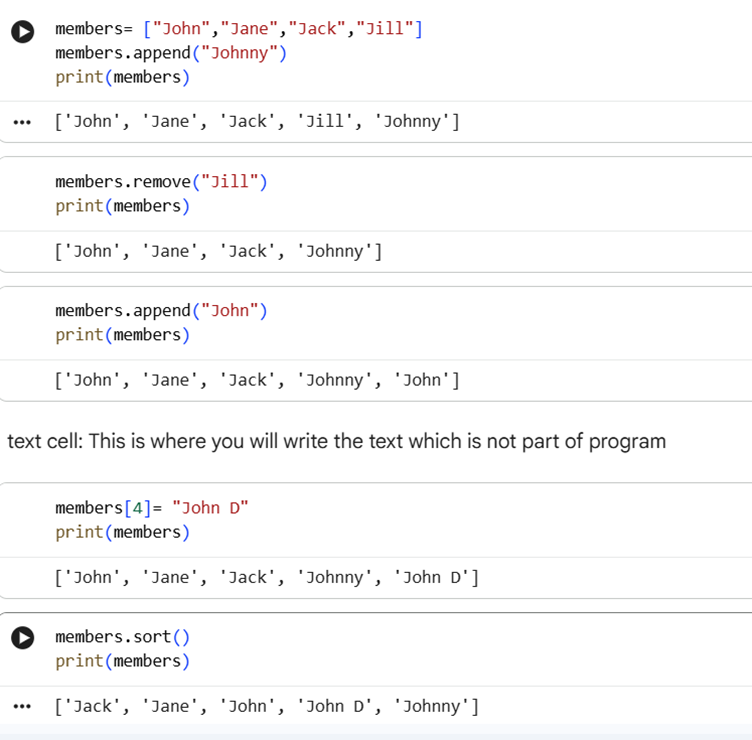
We can see the code executed for above situations and the results.
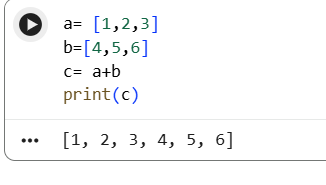
We can also add 2 lists.
Result will be as below:
Write A Program To Know About slicing the list
Program 3.1: Given a list of numbers, sort it, extract the middle one third values, and calculate their average. (List will have items in multiple of 3)
For example, given the list [2, 4, 1, 6, 8, 9], when we sort the list, we get [1,2,4,6,8,9]. Middle one third is [4,6]. Output is average i.e. 5
As our regular strategy, break down the problem.
- Start with a list of numbers.
- Sort the list.
- Find how many values belong to one third of the list.
- Use slicing to extract the middle one third values.
- Calculate the average of the extracted values.
- Print the result.
How to find middle 1/3rd? We know that total items in list will always be in multiples of 3.
If the list has 9 items, middle one third will start at 4th item (index 3) till 6th item(index 5).
If total items in list are n then, one-third portion will start at n/3+1 (4th position)
And it will end at 2*(n/3) i.e. at 6th position.
Since list are 0 based, we need to extract the portion of list from index 3 to index 5.
We can extract such part of list using :
numbers[3:6] will give us the items from 3rd index to 5th index (6 excluded, like in range).
Now, let s code:
numbers.sort()
n = len(numbers)
one_third = n // 3
middle_values = numbers[one_third : 2 * one_third]
average = sum(middle_values) / len(middle_values)
print(average)
Note:
numbers[2:] gives you slice of list from index 2 to last item
numbers[:4] gives you slice of list from start to index 3
numbers[:-1] gives you slice from start to the end except last item! Interesting, isn t it?
Tuples
A tuple looks similar to a list, but it is fixed.
Tuples use round brackets.
Accessing values of tuple works exactly like list. days[1] gives us 2nd value i.e. Tue.
Important point about tuples is we cannot change the values in tuple.
This gives error!
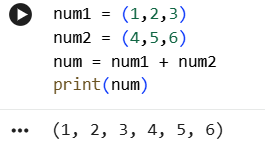
Only way you can add items to tuples is by joining tuples.
Progress Unlocked
- You learnt about purpose of collections
- You know about most important collection Lists
- You know about tuples
Dictionary
Now, Sci-Mate club wants to store the contact numbers of the members.
They tried to store the numbers in list.
But whenever manager wanted to find the number of a particular member using name, he had to find the index of member from members list and use it in contacts list.
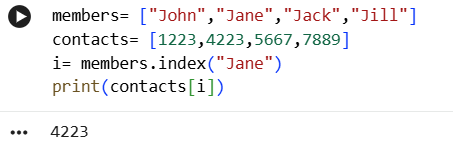
It was quite a long route!
What if, we can access contact number just by using contacts[ Jane ]?
This is where dictionary comes to rescue!
Dictionary is way to store data with labels.
Data is stored in key-value format and accessed using keys. Key is for labels and Value is for data.
We use curly brackets { } for dictionaries.
phone_book = {
"John":1223,
"Jane":4223,
"Jack":5667,
"Jill":7889,
}
phone_book["Jane"] gives us 4223!
What if we want to add Johnny’s contact?
It’s simple to add new item to dictionary.
phone_book["Johnny"] = 1212
It simply adds Johnny’s contact to phone_book.
When Jill decides to leave the membership, we simply use phone_book.pop("Jill")
If John wants to change the contact number?
Easy! Just assign new number to phone_book["John"].
phone_book["John"] = 5555
Using dictionary in loops comes in variations.
If we simply use
We x will loop through key values.
It is same as using:
If we use
x will loop through values.
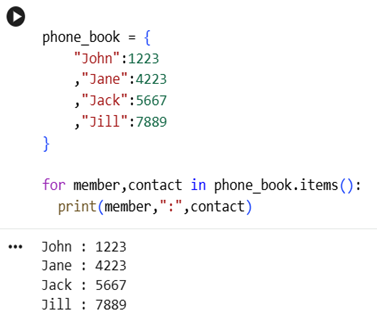
And, we can actually loop through both keys and values.
Simply use
 |
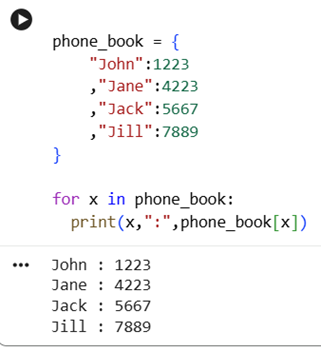 |
Notice that, both the codes provide same output!
Now, Sci-Mate club decides to store more details of each member like name, contact, address, membership id, membership fees paid or not etc.
Dictionary can be really useful in such situation.
We can create dictionary to store values of one member like this-
"Membership_ID":1,
"Name":"John",
"Phone": 1223,
"Address":"South block, Gotham",
"Fee_status": "paid"
}
Write A Program To Know About nested dictionaries
Now, we can store the more details of a member in very structured way.
But, how can we store details of multiple members and yet, able to access the details of with just membership ID?
We use dictionary within the dictionary.
One dictionary will store details of the member.
Other dictionary will dictionary of particular member as value and membership ID as key!
Check the program below:
Dictionaries storing membership details of John and Jane
|
{ "Name":"John", "Phone": 1223, "Address":"South block, Gotham", "Fee_status": "paid" } |
{ "Name":"Jane", "Phone": 4223, "Address":"North block, Gotham", "Fee_status": "Due" } |
We nest both the dictionaries into one.
members = {
ID1 : {
"Name":"John",
"Phone": 1223,
"Address":"South block, Gotham",
"Fee_status": "paid"
},
ID2: {
"Name":"Jane",
"Phone": 4223,
"Address":"North block, Gotham",
"Fee_status": "Due"
}
}
Keys are ID1 and ID2, values are the details of the members.
You can read it again, to grasp it.
This is a bit advanced but very useful concept.
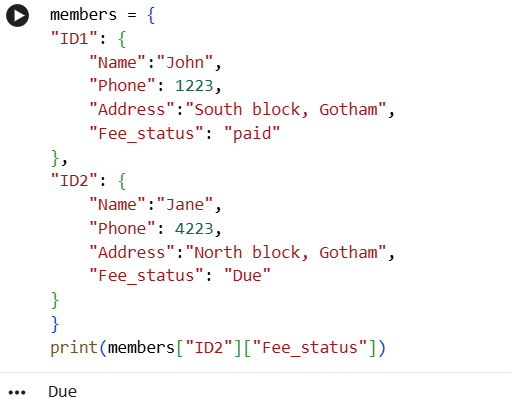
And, if we want to know the Fee_status of the member with ID2, what we will do?
Simple, access member with ID2 using key ID2 : members[ ID2 ]
And, access Fee_status of the member using key Fee_status : members[ ID2 ][ Fee_status ].
- You know about key, value and dictionary
- You can use dictionary to efficiently store and access data
Concepts we learnt revisited:
- Collections are used to store multiple data values into single variable
- Lists, tuples, dictionaries are some important collections
- You can manage values in list, sort the list, access subset of list
- You cannot change the values in tuples
- Dictionary stores value in key-value format. This makes dictionaries super useful to write efficient, quick and clean code.
- Lists are created using [ ], Tuples are created using ( ) and Dictionaries are created using { } with : used for assigning value to key.
1-Minute Challenge
Like nested dictionaries, we can have nested lists too. We primarily use them to store 2-dimensional data.
Write a nested list to store names and contacts of the members of Sci-Mate.
Hint: contacts = [[ "John" ,1223],[ "Jane" ,4223],... ] works well.
Contact numbers are at 2nd position i.e. at index 1. What will contacts[3][1] return? Try!