
Make Decisions and Repeat
View or download the code for this chapter on GitHub:
github.com/nousbase-edu-codes/First_Steps_in_Python
TL; DR
- Conditions = Asking "True or False?" to make a decision
- Blocks = A group of instructions that belong together
- Python uses indentation to define blocks of code
- Indentation = Adding space before a line of code to put it "inside" a block
- Loops = Repeating instructions so you don't have to write them multiple times
- while loop runs as long as its condition holds True
- conditions and loops together help solve real problems
Think about your daily life for a moment.
You decide things all the time.
If it is raining, you carry an umbrella.
If your phone battery is low, you charge it.
If you feel sleepy, you go to sleep.
You also repeat many things.
You brush your teeth every day.
You count money note by note.
You practice something again and again until you get better.
Programs work in the same way.
They take decisions and they repeat actions. If we want to say more technically, programs automate decision making and repetitive tasks.
How decisions are taken
Whenever we take a decision, we first check a condition.
If the condition is true, we do one thing.
If it is false, we do something else.
Programs follow the exact same idea.
Write A Program To Know About Conditions
Program 2.1: Check whether a person is eligible to vote.
A person is eligible to vote when he/she is 18 or above. Let’s break the solution to steps.
- You need to know the age of person, so, ask it. (use input function)
- Check condition, if person’s age is 18 or above
- If yes, then print "You are eligible to vote"
- Else, print "You are not eligible to vote"
Python has keywords (its vocabulary) like if and else to write such decision logic. (Note: case has to be same. So if is correct keyword and If or IF isn’t)
age = int(input("Enter your age"))
if(age>=18):
    print("Congratulations!")
    print("You are eligible to vote")
else:
    print("Sorry, you are not eligible to vote")
We already know, input( ) function.
Next is, if, a keyword.
And (age>=18). For regular user, ≥ symbol is difficult to type. So, python makes our life easy and for “greater than or equal to”, it has provided us with >= sign. Such sign is known as operator.
So, even if you read, intuitively, it reads “if age is greater than or equal to 18”.
If this is true, we proceed to the actions in the if block.
Before going further code, we need to understand how Python knows which instructions belong to a decision.
In a human to-do list, we might write:
- If it rains:
- Take umbrella
- Wear raincoat
- Go to school
Notice how "Take umbrella" is slightly shifted to the right? That tells us it is part of the "If it rains" plan.
Python uses this exact same logic. It is called Indentation.
- We use 4 spaces (or 1 tab) to shift code to the right.
- This creates a Block of code.
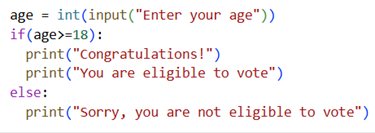 In an adjoining image, we can see code written with correct indentation.
Two lines of print are written below each other and after a gap from the left side
This is indentation.
It shows, two lines belong to same block of if. Both lines will be executed if the condition of block is true.
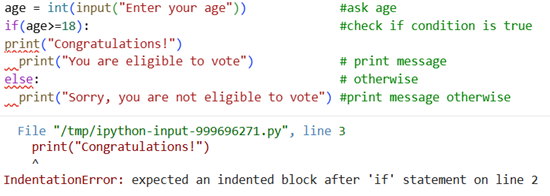 Now, let’s try to disturb the indentation by shifting print to left, just below if.
And…
We get the error.
Error message clearly says, indentation is incorrect.
You should always try to read errors and try to correct those as per error message.
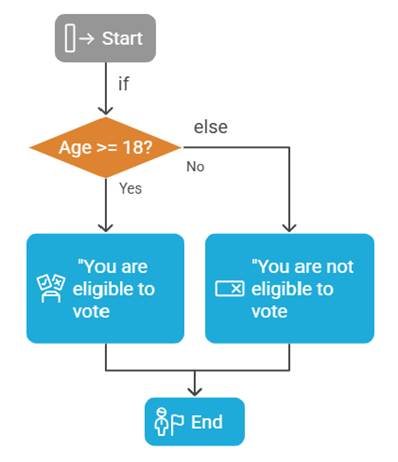
If the age entered by user is greater than or equal to 18, execute the block of if.
Else, execute the block of else. Pretty much intuitive.
This is how we turn the flow of code with if and else blocks.
If the condition is true, only the code in if block is executed.
If the condition is false, code in else block is executed.
Progress Unlocked
- You know how to check conditions
- You can decide what to do if certain condition is satisfied or not satisfied
- You know what are code blocks and indents, why indentation is important
Condition to check (age >= 18) is actually an expression.
It results in bool (Boolean) type of value.
This value can be True or False.
If the condition is satisfied, expression returns True value otherwise, it returns False value.
We can actually equate value of this expression to a variable.
See the example below:
age = int(input("Enter your age"))
is_condition_true = (age>=18)


if(is_condition_true):
    print("Congratulations!")
    print("You are eligible to vote")
else:
    print("Sorry, you are not eligible to vote")
This code prints exactly same result as the previous code.
See the code below:
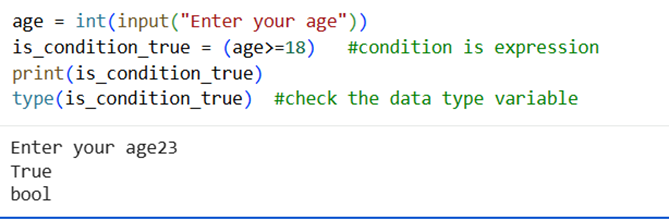
It prints the value that is_condition_true variable holds.
Next is, type( ) function. This function is used to know the data type of variable.
Notice the statements appearing in green, written after #
These are the comments, they are not read or executed by our program. We use comments to explain what’s going on in program at particular point. This helps reader of the code to understand the code.
Progress Unlocked
- You know conditions are expressions
- You can check type of variable and write comments in code
Write A Program To Know About Many Conditions
Program 2.2: Decide result based on marks
If marks are above 60: Good score, if marks are 40 to 59: Pass, if marks are less than 40: fail
Break the program into steps:
- Ask the user marks – accept input from user
- Check, if marks are more than 60, print "Good Score"
- Else, if marks are more than 40, print "Pass"
- Else, print fail.
Now, python has made our life easier. We have special keyword for else, if situation like in step 3. The keyword is elif (short form of "else if").
And we can simply write the code as before.
marks = int(input("Enter your marks"))

if marks >= 60:
    print("Good Score")
elif marks >= 40:
    print("Pass")
else:
    print("Fail")
Two points to Remember,
- one if can have many elifs, and one and only one else associated with it
- else is optional. Use it when you want to handle all remaining cases
- ifs can be nested into one another. We do it when we need to make complex decisions. We will see this in future chapters when we will solve logically deeper problems
Comparison
We have already seen how to express “greater than or equal to”. Here is, other symbols to compare.
| Symbol | Meaning |
|---|---|
| > | Greater than |
| < | Smaller than |
| == | Equal to (note we need here two = signs. = is used for assignment) |
| >= | Greater than or equal to |
| <= | Smaller than or equal to |
| != | Not equal to |
When these symbols are used in expressions (conditions), True or False is returned.
We can simultaneously check two conditions also.
For this, we use and and or.
When action is to be taken if both condition needs to be true, we use and.
When action is to be taken if any of the two conditions is true, we use or.
For example, a new club in town, Sci-Mate, has criteria for membership that a member
- Must be at least 18 years old
- Must be graduate in science
We use and here.
e.g.
if (age>=18) and (is_science_graduate):
     membership = True
else:
     membership = False
Later, club modified educational criteria, it started allowing science graduates or post-graduates in any stream.
So, this becomes:
if (age>=18) and ((is_science_graduate) or (is_postgraduate)):
     membership = True
else:
     membership = False
Notice, how we combined (is_science_graduate) or (is_postgraduate) in one bracket. Such that, value of this expression will be calculated first and then checked together with the other condition of age.
It works just like maths. ( ) first.
Now, two tasks for you:
- What is the data type of variables is_science_graduate, is_postgraduate and membership
- Write the complete program which asks user’s age, if he/she is science graduate, if he/she is post graduate and then decide if he/she can become member.
Try to write the program. It is a bit complex at this stage. We will solve together at the end of the chapter.
Progress Unlocked
- You know how to write conditions with comparisons
- You can check multiple conditions simultaneously
Repeat with the Loops
You know how to print.
How will you print numbers from 1 to 10?
print(1)
print(2) and so on.. not a good idea!
What if we want to print numbers up to 1000? Or we want to print numbers up to n which will be user provided?
We need to automate the task multiple times.
Python provides us for keyword. Anything in the block of for will be repeated as per the condition specified.
Write A Program To Know About Loops
Program 2.3: Print numbers from 1 to 10.
Plan the program.
We will use single variable for print function. Say, variable is i, we will use function print(i).
We will repeat this function 10 times.
During every repetition, we will change value of i starting from 1 to 10.
For this purpose, we will use function range( ).
range( ) function takes following inputs: 1. Starting number 2. Stopping number (this will not be included in returned range of numbers) 3. Steps (gap between 2 numbers)
steps is optional and has default value of 1. If we don’t provide any value, 1 will be assumed.
e.g. range(1,5) gives sequence [1,2,3,4] (5 excluded)
range(1,8,2) gives us [1,3,5,7] (steps = 2, each next number is ahead by 2)
now, interesting point, even start number is optional! Default value is 0.
range(6) gives us [0,1,2,3,4,5]
Now, how to use range to assign values to variable?
Simple, for i in range(1,11) works!
So to print numbers from 1 to 10,
for i in range(1,11):
     print(i)
Note: Notice the colon (:) and indentation to create block
for and in are both Python keywords.
It simply translates to do following tasks for every i whose value is in sequence of numbers returned by the range
We can write above line alternatively as do following tasks while i is greater than or equal to 10, at the end of the tasks, increase value of i by 1.
And Python provides us way to code in this dialect too!
As you might have guessed, we need while keyword, and condition (like in if).
Below is the program:
i = 1
while (i<=10):
   print(i)
   i=i+1
We assign value 1 to i. Then, we check condition with while, execute block of while and at the end, increase i by 1.
i = i + 1 seems mathematically incorrect! But in programming, this is just short way of saying,
new value of i = old value of i + 1
See, how Python makes our life so easy, allows us to write in short forms!
But it doesn’t stop here. You can even shorten this! Just write i+=1.
i+=1 is same as (i = i + 1)
Can you guess how to reduce value of i?
Yes, you are right. Replace + by -.
It even works for multiplication and division too!
So, (i* =2) is same as (i = i * 2). Just makes value of i twice.
Write A Program To Know About using loops and conditions together
Program 2.4: Print all the even numbers from 1 to n, where n specified by user.Plan the program!
- Ask user value of n using input function.
- Now, n needs to be a number bigger than 1 otherwise, there is no point in running the loop!
- So, check if n is greater than 1, if true, run the loop to print even numbers.
- Else, display message asking to enter number bigger than 1.
Program so far is:
n = int(input("Enter a number"))
if(n>1):
  #run loop to check even numbers
else:
  print("please enter number greater than 1")
Now, let’s write logic to find even numbers.
- Loop numbers from 1 to n
- In every loop, check if number is divisible by 2 (number % 2 == 0)
- If true, print the number
Notice, the expression number%2 returns the remainder when divided by 2. Condition checks if that remainder is 0.
Also note that we have converted input into int type using int( ).
This can be written as below
for number in range(1,n):
    if((number%2)==0):
        print(number)
Now, we replace this for block inside the if block and we are ready with the whole program.
n = int(input("Enter a number"))
if(n>1):
    for number in range(1,n):
        if((number%2)==0):
            print(number)
else:
    print("please enter number greater than 1")
Progress Unlocked
- You know how to repeat actions using for loop
- You know how to repeat actions using while loop
- You know range( ) and in
- You can combine conditions with loops
We have learnt a lot till now.
It’s time to handle now a bit difficult code that I had asked you to do.
Did you succeed? If not, let’s do it now.
Problem: Write a program to check if user can be the member of a new club in town, Sci-Mate
Conditions are:
- User must be at least 18 years old
- User must be science graduate or Post graduate (any stream)
Let’s plan the code step-by-step.
- Ask user age: By now, it’s simple with input( ) function. (just don’t forget to convert it to int)
- Ask user qualifications. Now, as a designer of program, we should ask right questions to user.
- It should be easy for user to enter answer
- It should be easy and unambiguous for us (programmer) to process.
- In the view of this, we can ask user question “Are you a science graduate?”, if user enters positive, we will grant membership. If not, we will ask next question, “Are you a post graduate (in any stream)?”. In case of positive reply, we grant membership, else, we don’t.
- But what should user reply? User can reply yes, Yes, YES, Yes, I am anything and that will make our processing difficult.
- For this reason, we will direct user to enter only as y for yes and n for no. In case of other replies, we will prompt user to enter y or n.
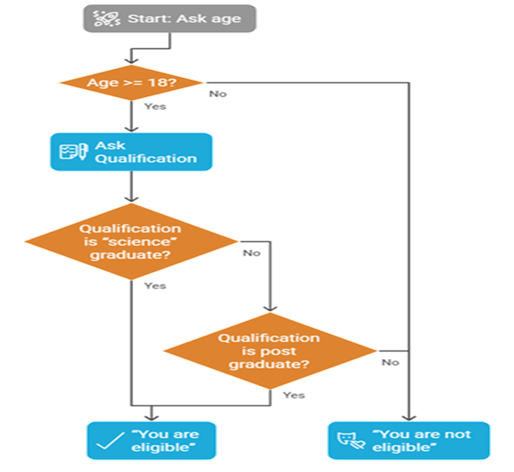
Flow of the code is as shown in an adjoining flow chart.
In future, we will keep improving our program for Sci-Mate making it better for user. As of now, we will work as per this plan.
Note that, we have blocks if inside one another.
This is called as nested blocks.
Let’s start with topmost block of if.
We will declare membership variable before if block starts.
The reason for this is, scope of variable.
To put in simple terms, if we declare membership variable out of all if blocks, all if blocks can access it.
If we declare it inside any if block, it will be accessible within that if block only.
You will need to think it intuitively.
You can intuitively compare it with the orders issued in office.
Head of the company is outside all blocks, so, can issue commands for all of the company.
Head of the department is part of a department, so, can issue commands to all the teams in his department.
Head of the team is part of team and thus can issue commands within his team.
NOTE: For now, think of it this way. We will learn exact scope rules later.
First stage: check age – Let’s write topmost block (Refer to the flowchart)
age = int(input("Enter your age"))
membership = False

if (age>=18):
     # check qualification conditions
else:
     membership = False
Second stage: Check if user is science graduate – We will add qualification logic.
age = int(input("Enter your age"))
membership = False

if (age>=18):
     is_science_graduate = input("Are you a science graduate? (y/n)")
     if(is_science_graduate=="y"):
           membership = True
     elif(is_science_graduate=="n"):
           # check other post graduate
     else:
           print("please enter either y or n only")
else:
     membership = False
If response is n, we check if user is post graduate.
Final Stage: Finally, we give our verdict.
age = int(input("Enter your age"))
membership = False

if (age>=18):
     is_science_graduate = input("Are you a science graduate? (y/n)")
     if(is_science_graduate=="y"):
           membership = True
     elif(is_science_graduate=="n"):
           is_post_graduate = input("Are you post graduate? (y/n)")
           if(is_post_graduate=="y"):
                membership = True
           elif(is_post_graduate=="n"):
                membership = False
           else:
                print("please enter either y or n only")
     else:
           print("please enter either y or n only")
else:
     membership = False

if(membership):
     print("You are eligible for membership")
else:
     print("You are not eligible for membership or You entered invalid input!")
We have informed user every time that response should be y or n only. These are good practices.
You should never take user for granted.
Progress Unlocked
- You have engineered a program that solves some real problem and makes real decisions!! Congratulations!
We have covered a lot in this chapter. Do not worry if you forget syntax. Thinking correctly matters more.
Concepts we learnt revisited:
- Conditions are used to change the flow of code.
- Different blocks of code are executed depending on condition is True or False
- We use keywords like if, elif and else to change the flow of code depending on the condition
- We can combine conditions with and and or
- We can nest conditions within one inside creating multi-level decision framework
- We can create sequence of numbers with range( )
- We use in operator to assign a variable different values from the sequence returned by range( )
- We use for block to repeat the tasks.
- We can also use while to repeat the task till certain condition holds true
- We intuitively learnt about scope of the variable
1-Minute Challenge
Write a program to print squares of even numbers from 1 to 10.
Hint: Use range(1,11), for loop to iterate through range and if condition to check even number.