
Welcome to your first step into the world of programming.
This book is designed to be your very first book on coding. While we will be using Python, our goal goes deeper than just learning a language.
This book builds the foundations of logic. It is a starting point, a gentle first step into the world of logic, coding, and clear thinking.
Anyone who wants to begin their journey into programming. Age is just a number; curiosity is the only real requirement.
If you can read, think, and try, you can learn programming.
Most programming books begin with a boring, 20-page chapter on “Environment Setup” and “Installing Python.” It is often where beginners give up before they even start.
We are skipping that.
My aim is to teach you coding quickly. We don't need to install complex software to learn logic. We are going to use the cloud.
To start your journey, we will use a free tool called Google Colab. It allows you to write and run Python code directly in your browser.
Step 1: Visit the Google Colab website: Google Colab
Step 2: Go to File → New Notebook.
Congratulations, your digital notebook is now open! This is where you will practice programming.
Step 3: You can save this notebook and use it again later. Let’s give it a name.
Click on the file name at the top of the screen (circled in screenshot below).
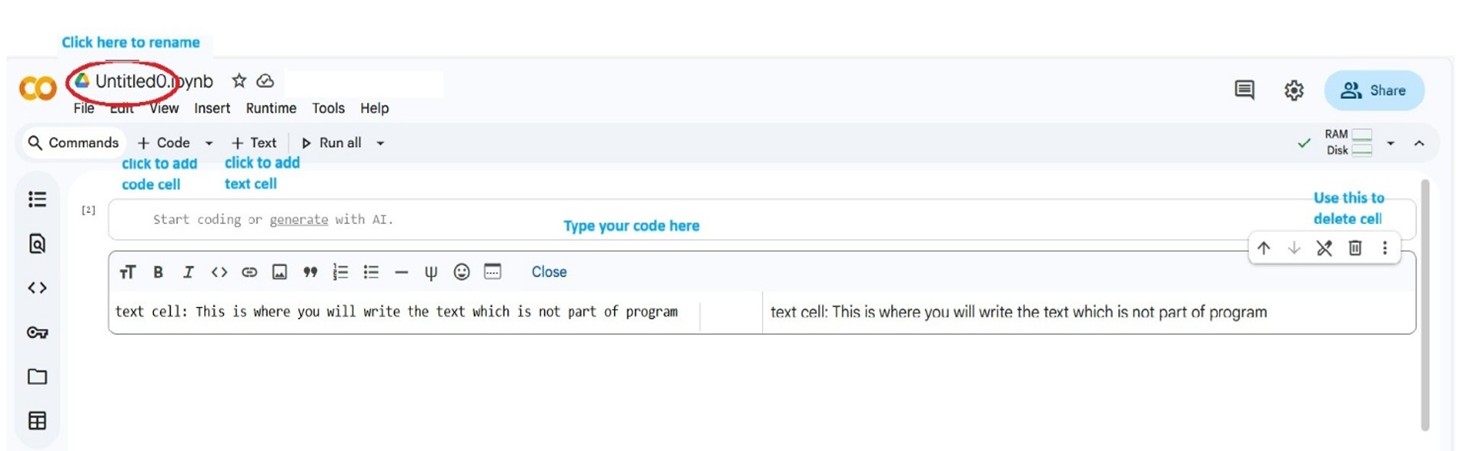
Type a name you like (e.g., My_First_Code).
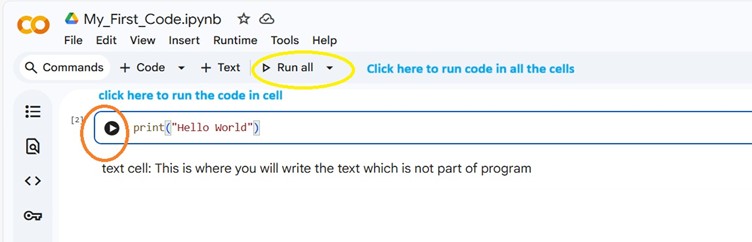
Inside the notebook, you will find two kinds of boxes (called cells):
You can add more cells anytime using the “+ Code” or “+ Text” buttons.
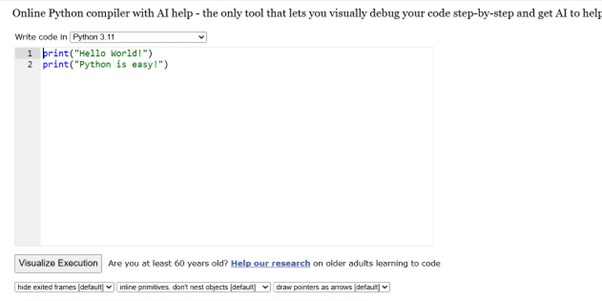
In a code cell, type:
(Type this code. Do not copy. Copy-paste may lead to errors.)
Now press the play button on the left, or press Ctrl + Enter.
And, you’ve written your first program!
It prints a message on the screen, and that simple act marks the beginning of your coding journey.
You can also run Python code using:
Python Tutor
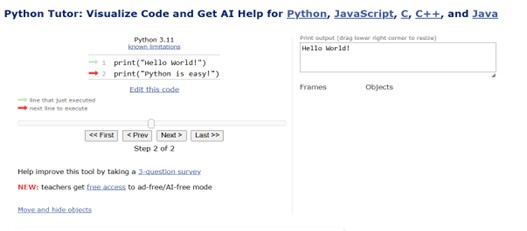
But remember, here code will execute line-by-line. You will need to click “Next” to execute the next line of code.
During the course, we will create a simple but complete application for managing membership of the Science enthusiasts’ club named Sci-Mate.
Next, we will see why programming is very easy.
This Book Is For:
This Book Is NOT:
When to read: Any time. Even right now.
A structured suggestion:
If at any point you feel:
If you finish this book honestly, you will not just know Python.
You will know how to approach problems.
That skill stays with you forever.